Lab 3:A Disturbance in the Force
Please Log In for full access to the web site.
Note that this link will take you to an external site (https://shimmer.mit.edu) to authenticate, and then you will be redirected back to this page.
Quick Reference
NOTE
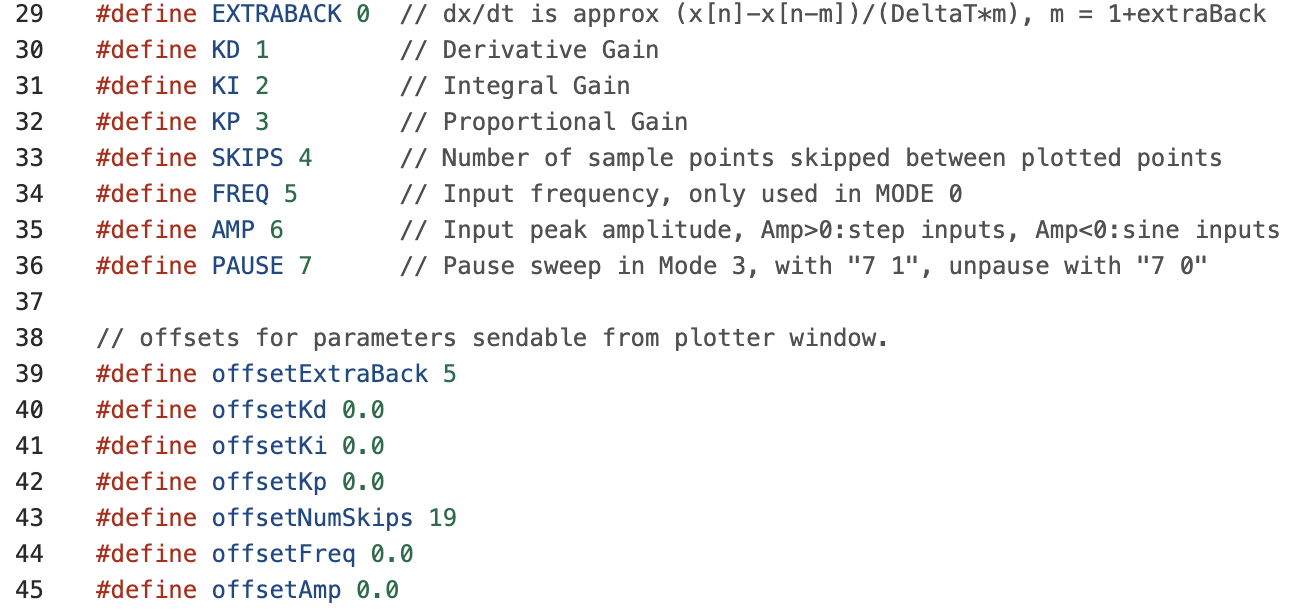
When the sketch is uploaded to the Teensy, it sets K_p, K_d, and K_i to 0.To get non-zero values, you must set them via the serial plotter send window.
Serial Plotter Send Window Indices and offsets
Links
Task Summary
- Add second motor to your arm, download the new sketch, re-calibrate angle sensor offset, and level the arm. (Checkoff 1).
- Set K_i = 4.0, K_p = 0.5, and find the smallest value of K_d for which the system is stable (step response settles to its steady-state after at least seven visible oscillations).
- Measure the frequency of the oscillation in the step response, and the magnitude and phase of sinusoidal steady-state responses for several input frequencies(Checkoff 2).
- Set the input to zero (6 0 in send window), then disturb the arm by fanning it, and find the "fanning resonance frequency" that maximizes the disturbance response.
- Consider how the following are related:
- the frequency of the oscillations in the step response,
- the frequency that maximizes the sinusoidal steady state response
- and the frequency that maximizes the disturbance response.
- Set K_i=0, K_p = 2, and for this case find a new smallest K_d for which the step response settles after at least seven visible oscillations. Turn off the input (6 0), and find the fanning resonance frequency.(Checkoff 3).
- Download the Ipython file,
ctPropArm.py,to a directory, start ipython in that directory, and at the python prompt type%load ctPropArm.py
- Adjust \gamma_a and \beta so the input-output frequency response of the model matches the steady-state magnitude and phase of your arm's input-output response at a few points. NOTE, these are not the same values from lab2, as you now have two props!
- Derive the disturbance to output transfer function, and so that it also computes the disturbance frequency response. Fan your arm to demonstrate that your model's disturbance frequency response accurately predicts the most disturbing frequency.
- Use your model (and ipython) to design a controller with better disturbance rejection by examining the disturbance frequency response. Fan the arm to demonstrate the improved disturbance rejection of your better controller.
Double the Fun
Add a second motor to the right side of the arm as shown in the picture below.

Clamp your arm to the side of the lab table, but make sure the plate sticks out beyond the end of the lab bench (to minimize air resistance). See the images below.


For this lab, please position both motors further away from the angle sensor than for last lab, a 14-hole spacing that we can measure using the "disturbing U" from last lab (see picture below).

Rotate the arm from -180 degrees to +180 degrees (-\pi to \pi radians) and check wiring, as shown below.

Check that the arm is nearly balanced. First test that the arm is nearly balanced with the power off off (the arm might or MIGHT NOT stay level when the power is off, but it should "feel" close to balanced). Then connect both power supplies (the 5V USB power supply AND the 5v 10 amp power supply) to the controller board and connect your laptop to the Teensy. Download the sketch linked at the top of this page, upload it to the Teensy, and start the serial plotter. Note that the offsets for K_p, K_d, and K_i are all zero. Below you will change these gain values to get enough feedback for the arm to level itself.
Hold the arm level and ensure the plotter shows a zero angle. If not, adjust the AngleOffset in the Teensy sketch (you may be able to use the same AngleOffset from the week 2 sketch). Once the sensor is calibrated, stop holding the arm, and try to level the arm by adjusting the black potentiometer (in the upper right hand corner of the board). The potentiometer can be used to adjust the relative thrust of right and left propellers, so that the arm holds itself level (set K_p = 0.1 first, otherwise the arm will just drift).
Tip: If your motors are not turning, here are some troubleshooting steps:
- Is the high-current power supply (round connector) plugged in?
- Did you download the sketch for Lab 3 and upload to your teensy?
- Check the connection between each motor and its extension wires. It is very easy to bend the pins in the extension wire connector, THIS IS THE MOST COMMON ISSUE!!! Get new extension wires!
- Check the connection of the extension leads to the screw terminals on the circuit board. There should be about 3mm of bare silver wire for the connector to grab, and should invisible outside the screw terminal. If uninsulated silver wire is visible outside the screw terminal, that wire could "short" and damage the board.
- Use a multi-meter (there are about a dozen of them distributed around the lab, ask for help) to check the potential difference across the two terminals at the controller board. Touch the multi-meter voltage probes to the screws and check if there is a non-zero voltage, if not feel free to ask staff for help.
Tip: Make sure that both propellers are blowing air downwards. If they are not, there are two ways to fix this, swapping wires or editing the code. EDIT THE CODE, it is much easier. Find lines 278 and 280 and replace the order of B1L and B2L or A2R and A1R depending which motor needs to be changed, note that these ports are labeled on the PCB.
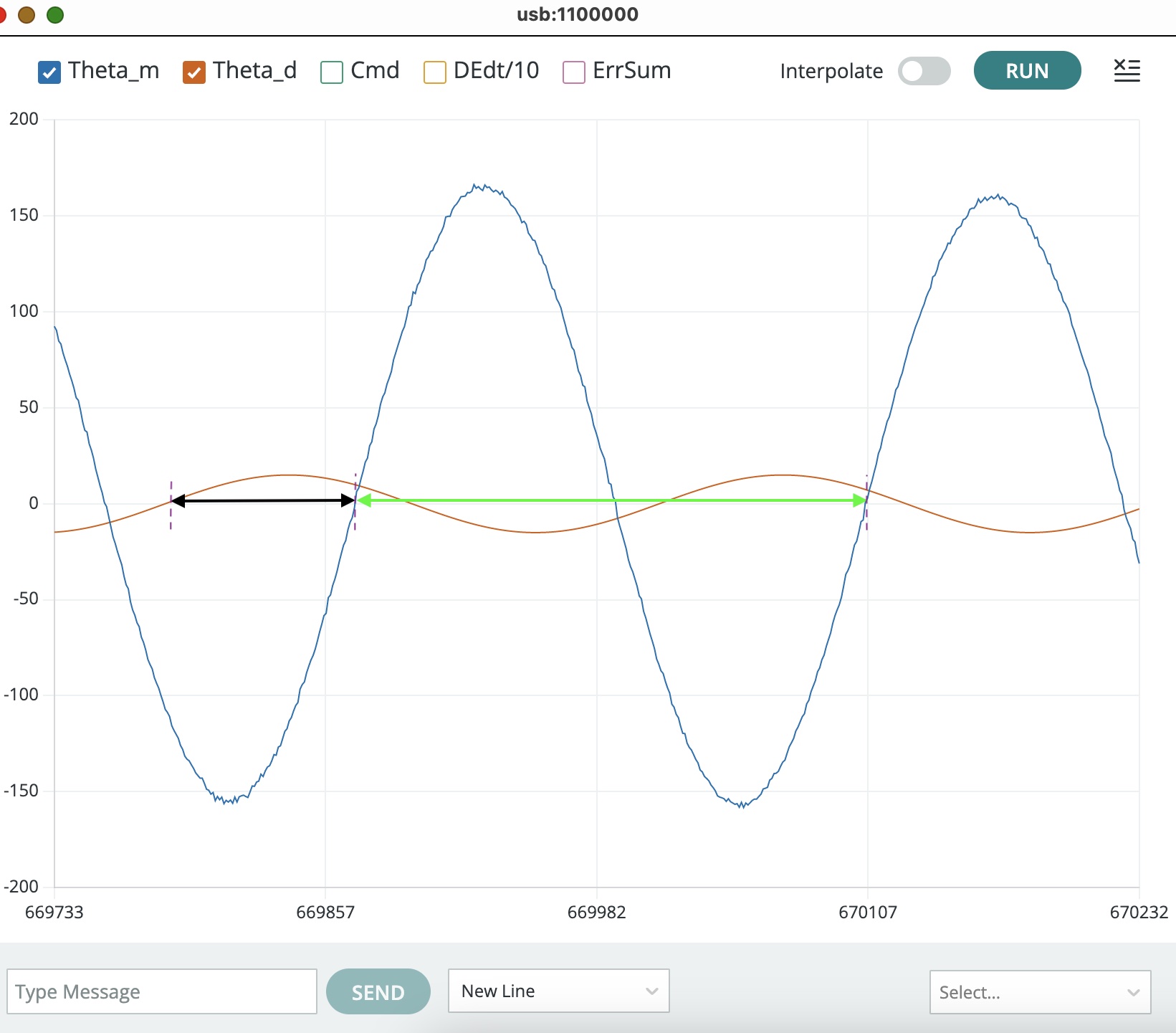
The figure below shows serial plotter output from running the this lab's sketch on a propeller arm (from prior term of 6.310!!!) with a sinusoidal input (in red) and the resulting measured angle (in blue). Notice the two intervals measured on the plot, one denoted with a black double arrow and the other with a green double arrow. How does the ratio of those two intervals relate to the phase difference between the two plots?

Steps, Sinusoidal and Interference.
Step response.
Set K_p=0.5; K_d=0.3; K_i=4.0 and then type "6 0.1" and "5 0.05" to generate an input that is high for 10 seconds, then low for 10 seconds, and then repeats (Note that the plot window is 10 seconds wide, and the plot points are 20 milliseconds apart). Then try a few different values for K_d. You should be able to find a K_d between 0.1 and 0.3 that produces a step response similar to the one in the following video. Notice that in the video, the step response visibly oscillates about seven times before settling, the step response of your arm with your selected K_d should oscillate similarly (seven visible oscillations).
Again, notice the number of visible oscillations in the above figure, and ensure your arm step response oscillates similarly.
Measure Frequency Response
In theory, measuring the frequency response of a STABLE linear system is easy:
- Pick a frequency and apply a sinusoid of that frequency to your system's input.
- Wait for the system's natural responses to die out (they must die out eventually, since the system is stable). What remains will be sinusoidal at the same frequency as the input.
- Compare the input sinusoid to the output sinusoid and compute the amplitude ratio and the phase difference.
We can measure the frequency response for our two-propeller arm system using the above approach as long as we are careful about three issues described below.
Monitor Motor Commands
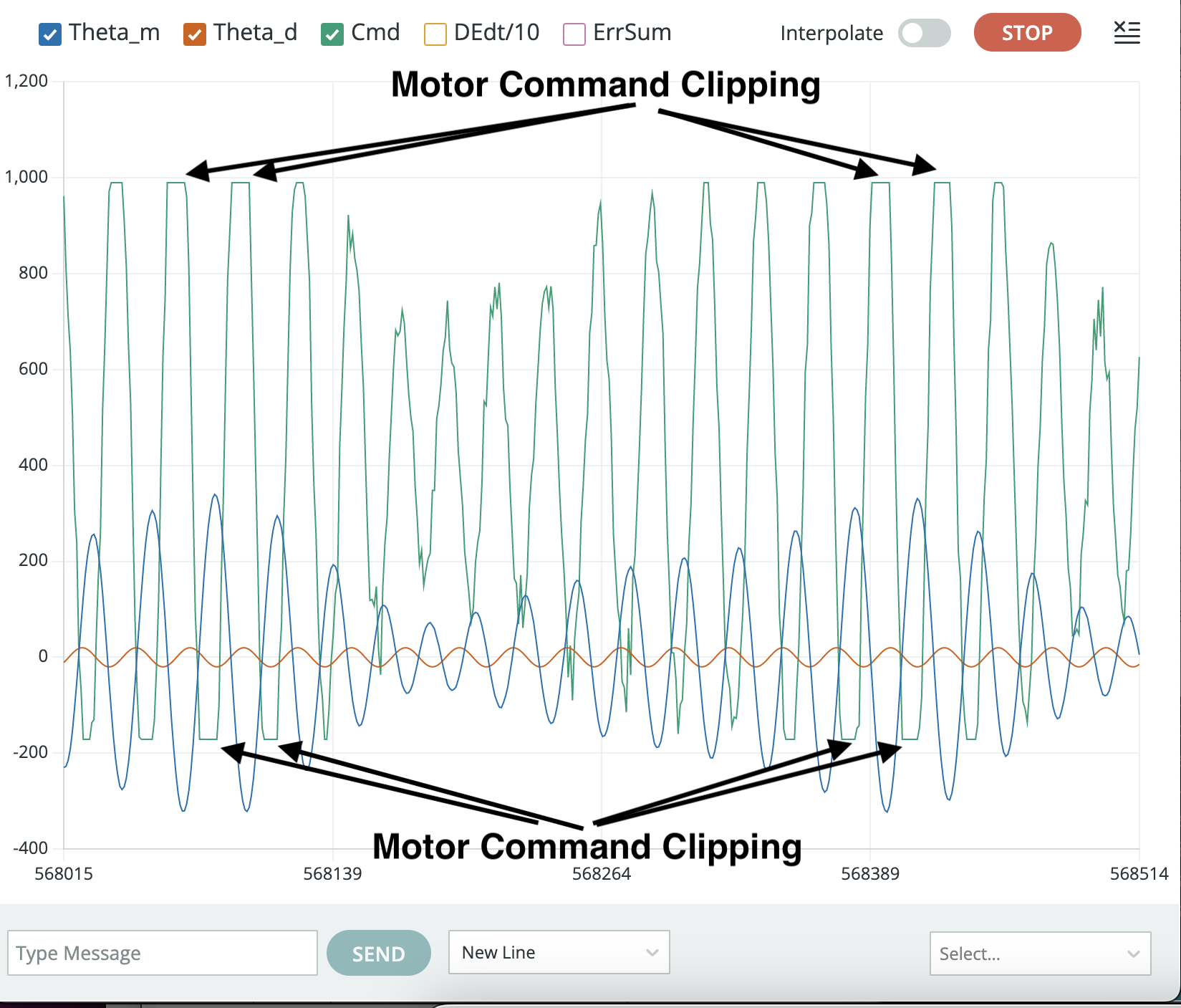
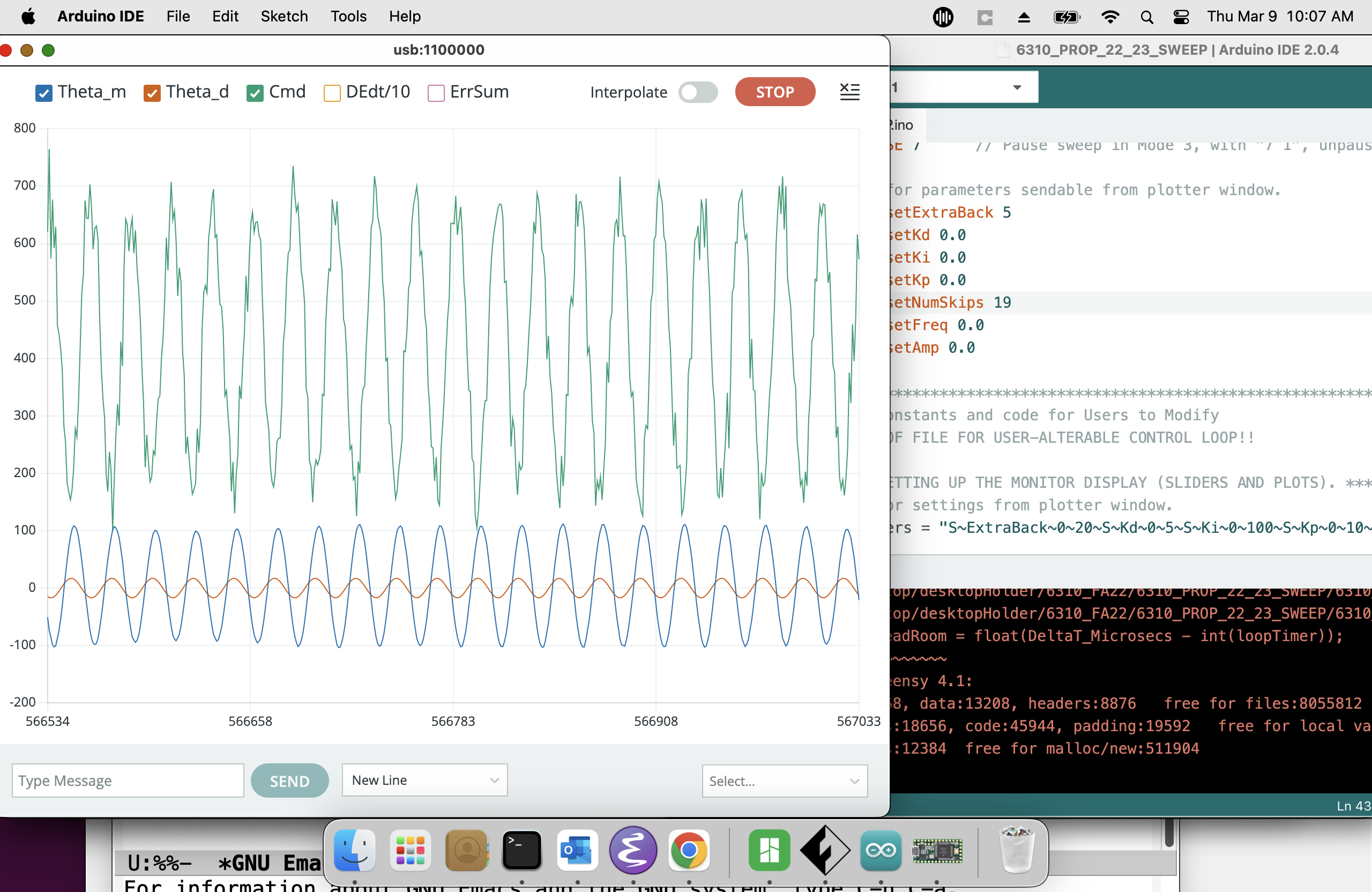
While the two-propeller arm is intended to cancel the gravity-induced nonlinearity of the one-propeller arm, the cancellation is only perfect if the arm is perfectly symmetric (so balance the arm as best you can!). In addition, there is still a "clipping" nonlinearity that arises when the controller-generated motor commands exceed power supply limitations. This nonlinearity can usually be avoided by reducing the magnitude of the sinusoidal input, provided the clipping has been detected.
Monitor the motor command plot whenever measuring frequency response, to ensure the commands are not being "clipped" by power supply limits. The clipping effect is easy to spot, as shown in the figure below. The black arrows point to cases where the motor command (the green curve) flattens, an indication that the controller's commands are being clipped because of power supply limitations.
The clipping problem can usually be eliminated by reducing the input amplitude, as shown in the picture below. Avoid reducing the input amplitude too much though, because the micro-controller won't be able to represent the signal accurately. Use index 6 in the plotter window to set a reasonable sinusoidal amplitude (do not make the sinusoidal amplitude less negative than -0.03, smaller amplitudes are not converted accurately by the controller board).
NOTE: USE NEGATIVE AMPLITUDES, THE SKETCH WILL GENERATE STEPS INSTEAD SINES IF YOU USE POSITIVE AMPLITUDES.
Wait for Steady-State
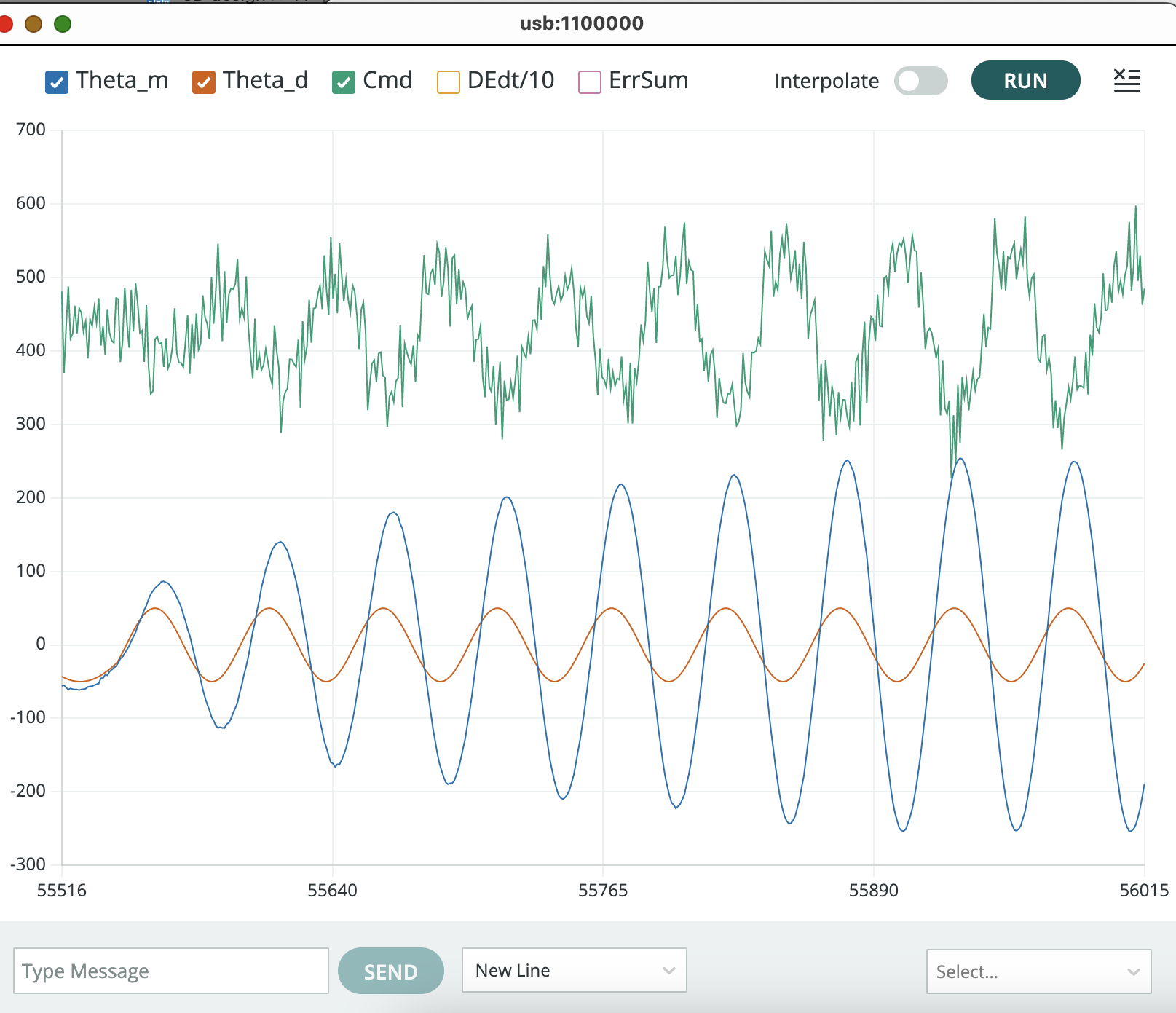
It can take several seconds to achieve sinusoidal steady-state, a typical case is shown in the picture below. Be sure to wait long enough (ten seconds or so) before pausing the plotter and taking measurements.
Spread Samples
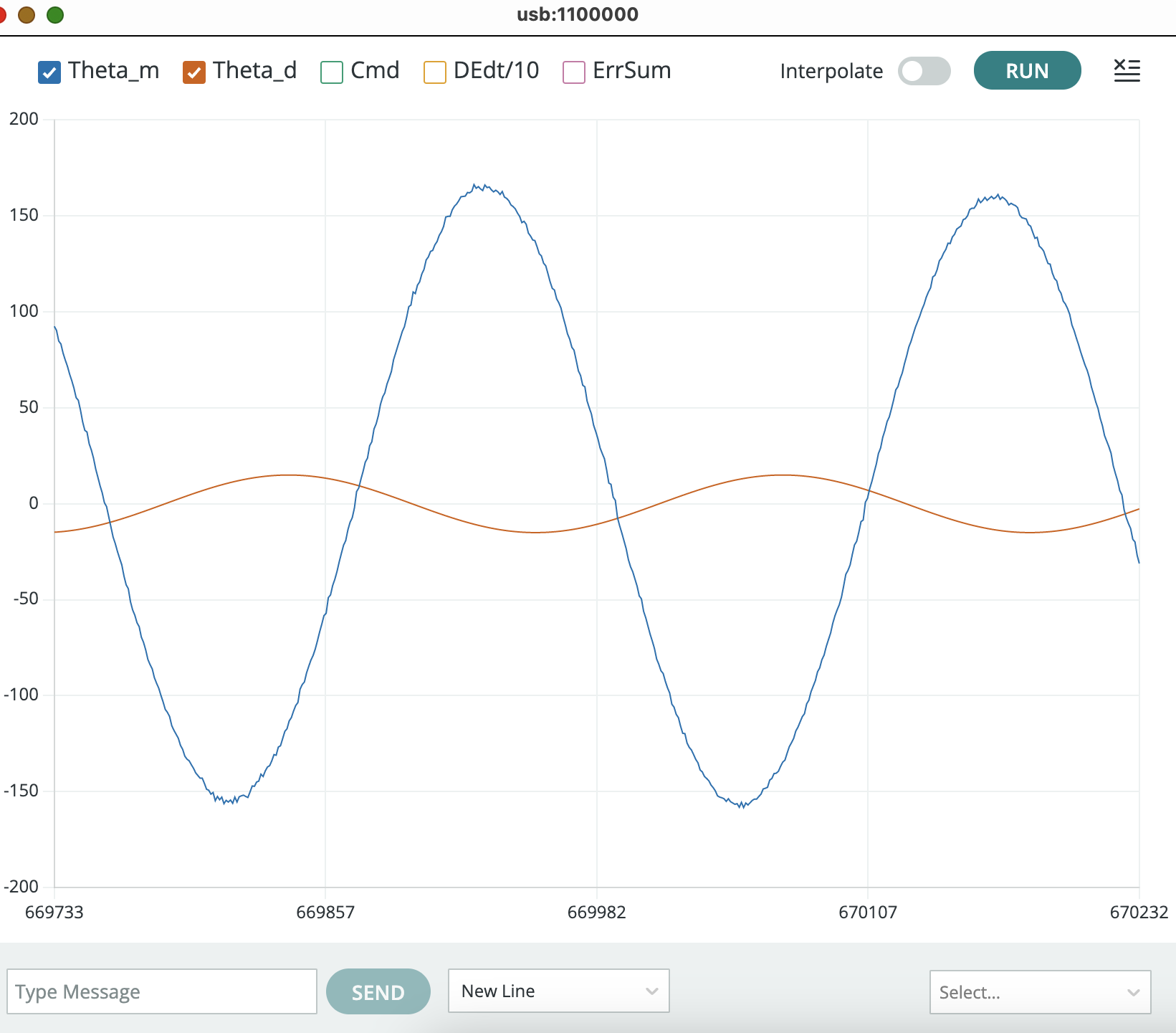
In last week’s lab, we sent an update to the serial plotter every 10 milliseconds. For this week, the sketch default is to send an update to the serial plotter every 20 milliseconds. At higher sinusoidal frequencies, it may be helpful to decrease the time between plotter updates to measure time more accurately. The control algorithm runs every millisecond, so the fastest serial plotter update is once per millisecond (zero skips). To set the fastest update rate, type "4 -19" into the plotter send window (as was done to generate the plot below). Note that the default offset for number of skips is set to 19 in the code. As another example, to update the serial plotter every 10 milliseconds, we want to skip 9 samples so type "4 -10" (to reduce 19 skips to 9) in the plotter send window.
Checkoff 2
For the second checkoff, please measure the frequency response of your propeller arm, with K_p=0.5, K_i=4.0 and the value for K_d you found above. You should notice that for a very narrow range of input sinusoid frequencies, the arm response increases by five fold. We refer to this phenomenon as a resonance, and the center of the associated frequency range as the resonance frequency.
- Remember that the default time between plot points is twenty milliseconds.
- Measure the frequency of the oscillation in the step response.
- Measure the amplitude ratio (measured amplitude / input amplitude) and phase shift of sinusoidal steady-state responses for several input frequencies. Try to find the a lowest frequency for which the phase difference between input and output is at least 30 degrees (though no more than 60 degrees), and the lowest frequency for which there is a $-135$-degree phase shift. We suggest you use index 6 in the plotter window to set a very small sinusoidal amplitude (-0.03), because, at just the right frequency, the arm response can become quite large.
Once again, with feeling.
Set the arm input to zero (6 0 in the send window), but do not changes the feedback gains (K_i=4, K_p=0.5, and K_d is the just-barely-stable value you found in the last checkoff), and try to "fan" your system into resonance. You should be able to excite a resonance, like in the video below. Note that the resonance frequency for the arm in the video below is probably higher than yours, and you will try the higher resonance frequency case next. At higher resonance frequencies, it can be hard to "match" your fanning to the resonance, please watch until (or skip to) the end to see what that looks like!!
Now try the higher resonance frequency case, set K_i=0, K_p = 2, adjust K_d so that you get a "barely stable" step response like in the video below.
Checkoff 3
For this checkoff,
- Set K_i=4, K_p=0.5, and K_d the just-barely-stable value you found in the last checkoff.
- TURN OFF THE INPUT, and try disturbing the arm by fanning it. Find the "fanning resonance frequency" that maximizes the response.
- Set K_i=0, K_p=2.0, and K_d to the just-barely-stable value for this no-integral-feedback case.
- Measure the frequency of the oscillation in the step response, and determine the input frequency that maximizes the sinusoidal steady-state response.
- TURN OFF THE INPUT, and try disturbing the arm by fanning it. Find the "fanning resonance frequency" that maximizes the response.
- For these two sets of controller gains, what did you observe about the relationship between the frequency of oscillations in the step response, the frequency that maximizes the sinusoidal steady state response, and the fanning frequency that maximizes the disturbance response?
Finally, verify that you can run ipython with the control library by downloading our ipython file, ctPropArm.py, to a directory. Open a terminal window in that directory (powershell on Windows, terrminal on Macs) and type ipython and return. NOT python but ipython for interactive python.
If ipython is not recognized, use pip to install ipython. Type pip install ipython followed by a return, then pip install control followed by a return. You may also need to install numpy and matplotlib using pip.
If python and pip are not installed on your laptop, but pip3 and python3 are, they may not work (or at least we don't know how to make them work). We suggest installing the anaconda package here, but you can also install python from python.org.
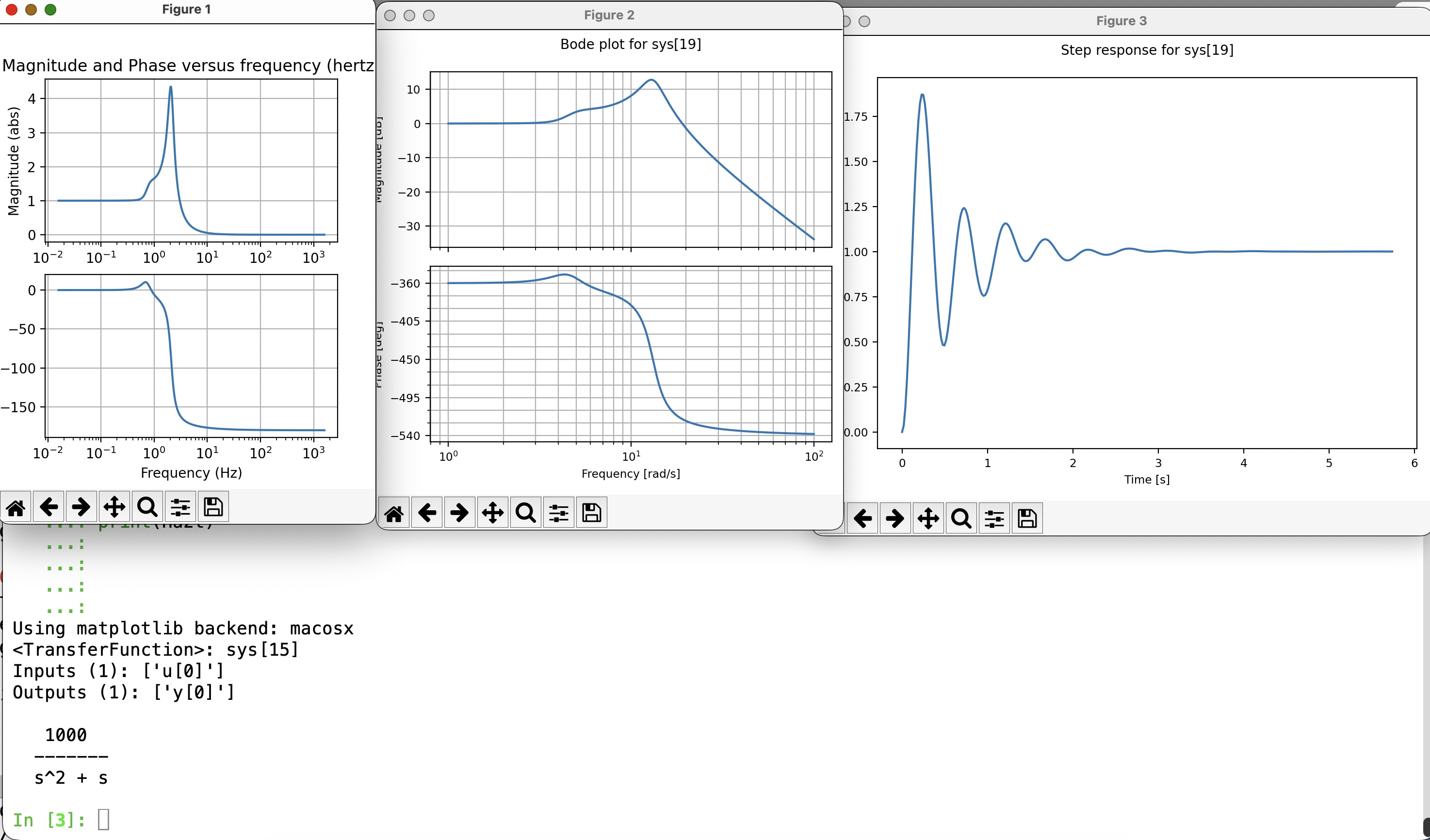
Once you have installed ipython and started it, you should get a prompt. At the prompt type %load ctPropArm.py. Then type return. You should see plots and a command window like in the screenshot below.
STOP HERE FOR WEEK A!!!!
Continuous Time (CT) Modeling
Last lab we derived an approximate discrete-time (DT) model for the innately continuous-time (CT) propeller arm. We chose discrete-time partly to match our innately discrete-time Teensy-based controller, and partly because discrete-time models, at least the ones formulated as systems of linear difference equations, have explicit solutions in the form of easily computed sums. For this and the next few labs, we will do the reverse. That is, we will derive CT models for innately-CT physical artifacts, and create approximate CT models for our innately-DT controllers.
We are switching to CT because the concepts we are exploring next, transfer functions and frequency response, have a simpler and more intuitive description in CT. And that simplicity will allow us to gain new insights into control system design.
Doubly-Driven Arm
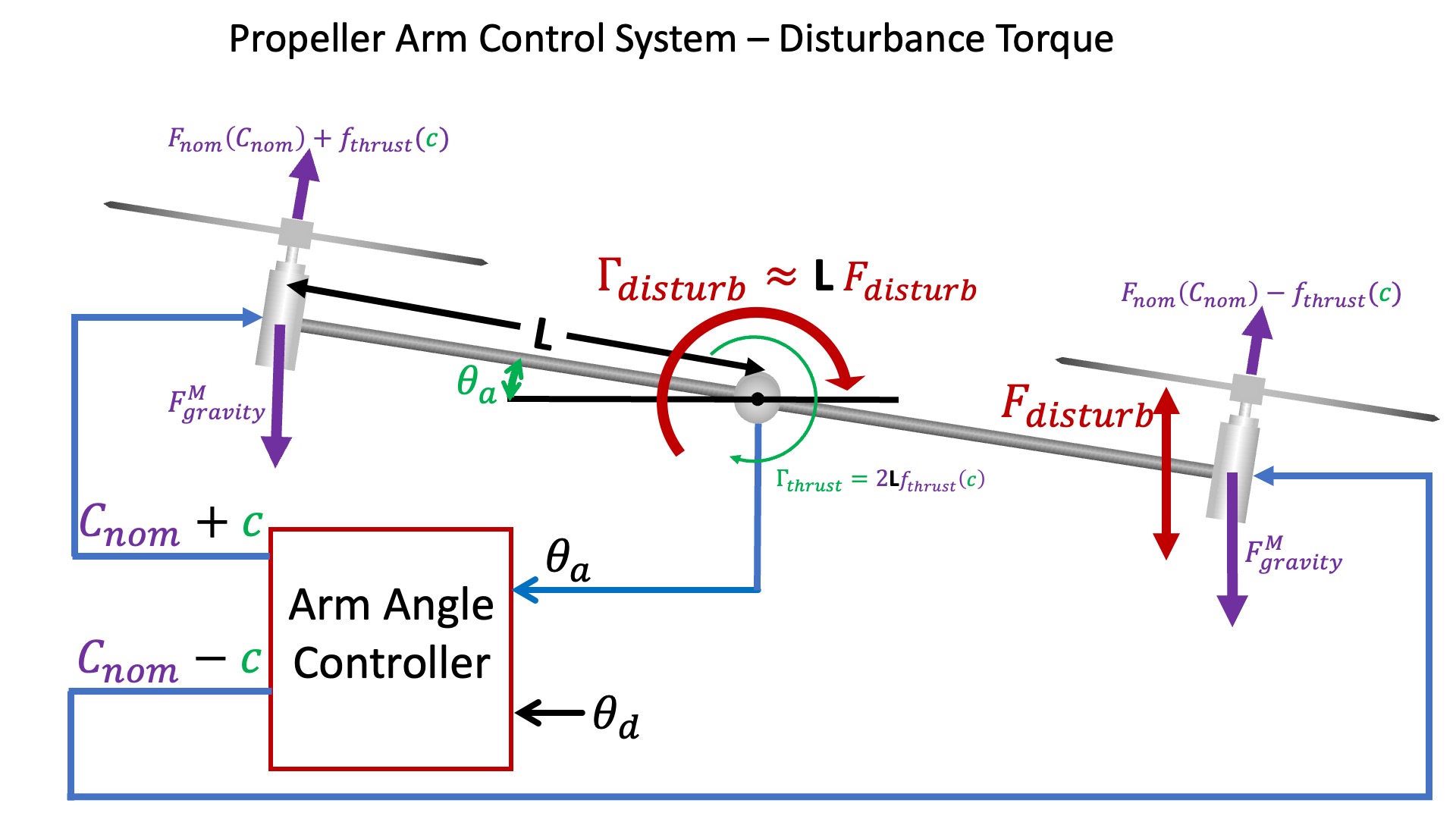
The larger number of forces and torques for the doubly-driven arm are depicted using a more abstract picture (below) than we used for the singly-driven case. In this picture we show the motor commands (C_{nom} and c), the measured and desired arm angles (\theta_a and \theta_d), and the motor thrust (F_{nom} and f_{thrust}) and gravity (F_{gravity}) forces.
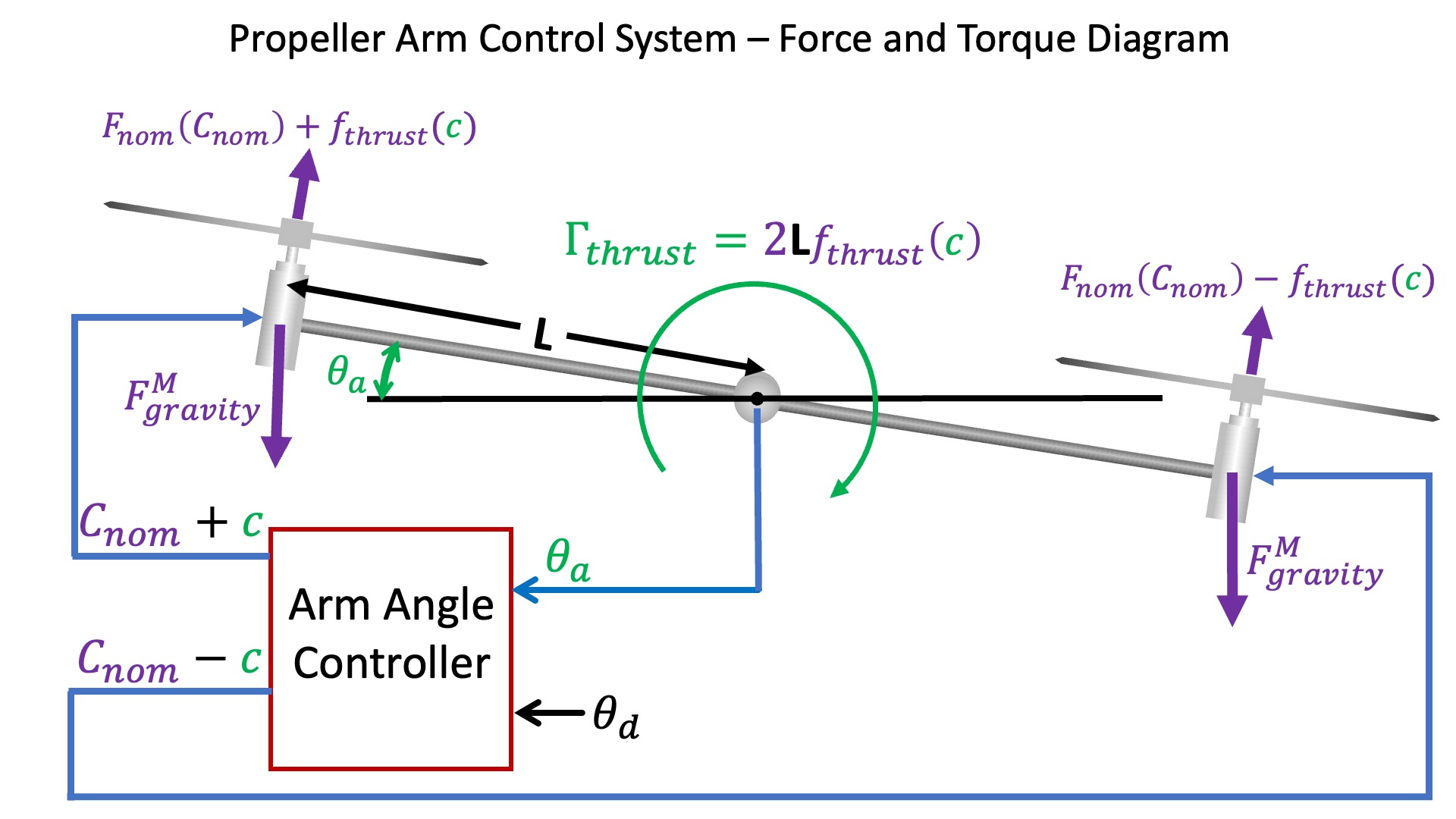
This picture also explicitly illustrates the arm torque (\Gamma_{thrust}) due to the difference in right and left motor thrusts. In the last lab, we did not model disturbances, and implicitly assumed the net torque on the arm was due to motor thrust alone. Under that assumption, \Gamma_{thrust} was an unnecessary intermediate in the relation between motor command and arm acceleration. This lab is focused on modeling disturbances, and since our example disturbances (fanning and dropping weights) generate torques, their effect on arm acceleration will be easier to model if we can add them to an explicit \Gamma_{thrust}.
Discrete-Time (DT) to Continuous Time (CT)
In the first propeller-arm lab, we related the change in arm angle, \theta_a, to the arm angular velocity, \omega_a,
Similarly, we related the change in arm angular velocity to the arm angular acceleration, \alpha_a,
Block Diagrams
Simple Model, Simple Control
In our simplest arm model, angular acceleration is assumed proportional to motor command, and in the simplest controller, the motor command is assumed proportional to angle error. In discrete time,
We can combine the equations for the arm, from the previous section, and the equations for the motor and controller (above) into a CT block diagram, shown below.
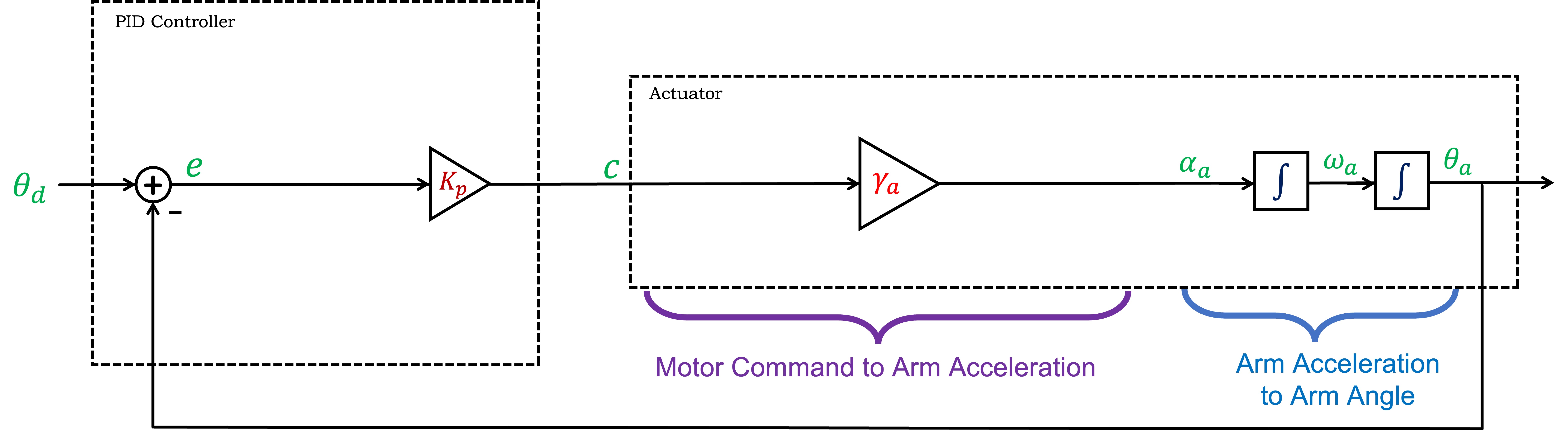
Note that in the CT diagram, we combined blocks with integral operators rather than combining blocks with derivative operators, a choice that parallels our intuition. That is, the system's controller sets the acceleration, which integrates to velocity, which in turn integrates to position, which we then measure and feed back.
Simple Model, PID control
We know that proportional feedback alone can not stabilize the propeller arm, so derivative feedback is essential, and we also know that integral feedback improves steady-state tracking. Including all three (P,I,D) in a CT block diagram is easy, because the integral and derivative relations can be represented explicitly as integral and derivative blocks (see below), rather than by approximations based on differences.
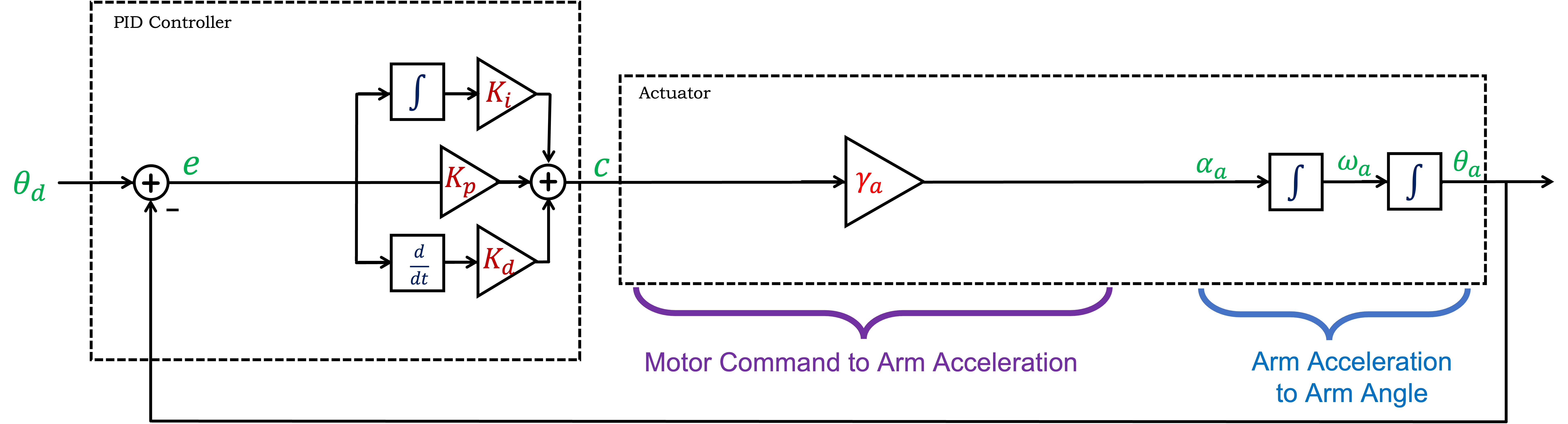
Note that even though we are representing the arm control system with a CT block diagram, the derivative and integral controller terms will still be approximated on the microcontroller using scaled angle error differences and running sums. Nevertheless, we will continue to approximate the DT behavior with a CT representation, because we can model the system with simple block diagrams and develop intuition and insight.
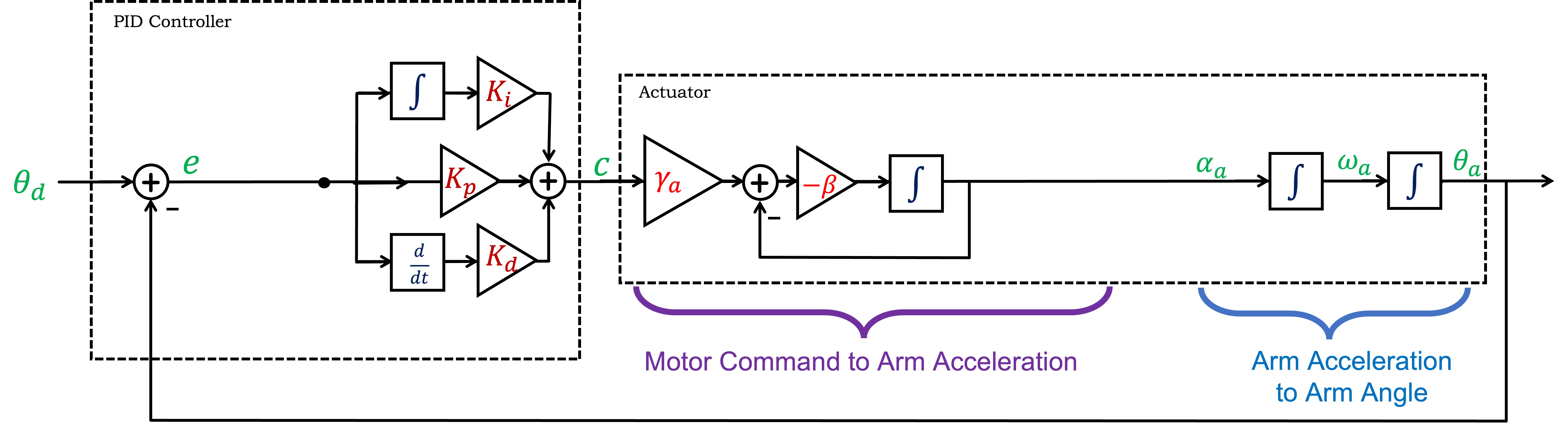
Non-instant Motor Model
As we saw in the first propeller-arm lab, a more accurate model for the relationship between motor command and arm acceleration is
Transfer Functions
The above block diagram, often referred to as an integrator-adder-gain block diagram (for obvious reasons), offers very limited insight into system behavior. Each of the blocks indicates a relationship between an input and output variable, e.g. the arm rotational velocity is the integral of arm acceleration, but there is no simple way to compose the blocks. We might imagine a double-integral block to synthesize a relation between arm acceleration and arm angle, but how will we compose the blocks and the feedback into a relation between desired arm angle, \theta_d, and measured arm angle \theta.
In this lab we are transitioning from DT difference equations and matrix representations to CT differential equations and transfer functions, because transfer functions can be easily composed. Since transfer functions are rational functions, that is, ratios of polynomials in s (where we have seen that s can represent the differentiation operator, or can be a complex number, depending on how we are interpreting the transfer function), when we compose transfer functions using addition, subtraction, multiplication or division, the result will always be a ratio of polynomials in s, that is a rational function of s, so the result will be another transfer function.
Transfer Function Notation
As discussed in lecture, regardless of interpretation, we replace differentiation with multiplication by s, as in
We denote the transfer function for the plant (for our arm, from motor command to propeller arm angle) as the rational function H(s), and denote the numerator and denominator polynomials as
Similarly, the transfer function for the controller, K(s), is a rational function whose details are denoted as
We denote the transfer function that relates the measured arm angle to the desired arm angle as G(s), which can be determined from K(s), H(s) and the feedback configuration, by applying Black's formula. For the case of the arm controller, in which the measured arm angle is fed back and compared to a desired arm angle, G(s) is given by
Transfer Function Properties
Once we have determined
The system described by G(s) is stable if its natural frequencies have negative real parts. As we saw in lecture, if the complex number \lambda_i is one the system's natural frequencies, then d_G(\lambda_i) = 0, and therefore
If the poles of G(s) are stable, then the response to a sinusoidal input will EVENTUALLY be a sinusoid (sinusoidal steady state). Sines and cosines are weighted combinations of complex exponentials, and since exponentials have analytically simpler derivatives, we use in any mathematical analysis. That is,
Frequency Response
So far, we have designed discrete-time controllers by trying to minimize steady-state error by maximizing K_p, within the constraints associated with stability (recall that in discrete time, natural frequencies are stable if are all less than one in magnitude). We could follow the same path in continuous-time, minimizing steady-state errors by maximizing K_p while maintaining stability,
Whether in DT or CT, we can use frequency response to change our approach to controller design. As we will start to see in this lab, and explore further in the next lab, we can design good controllers if we know the actuator's frequency response (its sinusoidal-steady-state response to a sinusoidal inputs as a function of frequency).
And the reason we switched to CT before examining frequency-response-based controller design? First, we can capitalize on our shared experience with the physical world, experience that gives us a lot of intuition about CT frequency response (e.g. how good are your headphones, what's fastest human drum roll, how do we pump our legs on playground swing). And second, the formulas are simplier in CT.
Arm Block Diagram using Transfer Functions
Replacing the integrals in the CT block diagram with \frac{1}{s} is the first step in using transfer functions, as in the diagram below.
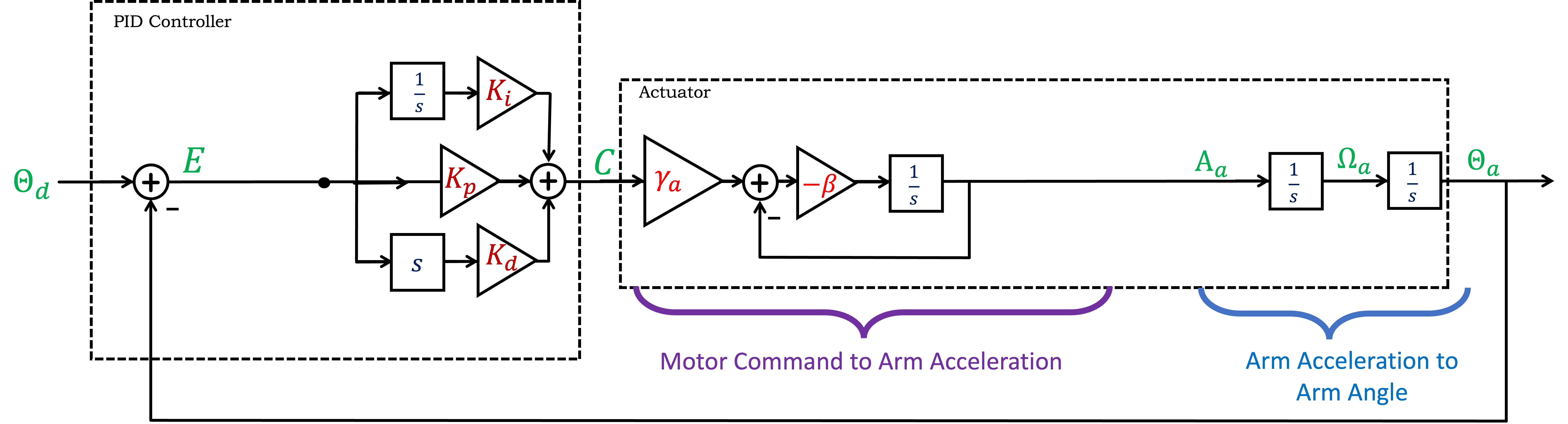
REMINDER: USE CAPITAL LETTERS when we use transfer functions. That is, use capital letters when substituting, for example,
As noted above, blocks described by tranfer functions can be composed by multiplication, and internal feedback loops can be simplified using Black's formula, leading to the following diagram below.
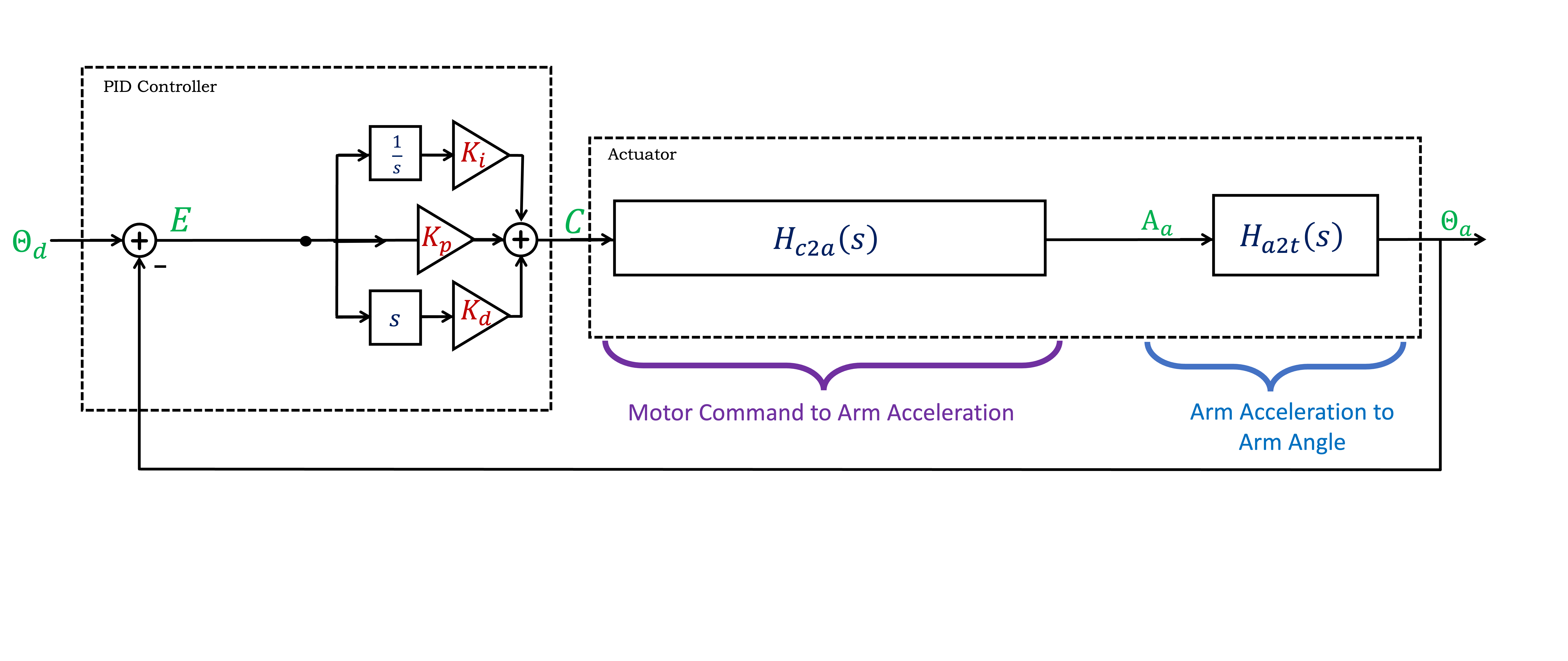
What is the command to acceleration transfer function, H_{c2a}(s), and what is the acceleration to \theta_a transfer function H_{a2t}(s) (where the "t" stands for theta)? See below if you need a hint.
We can simplify the diagram further by denoting H(s) = H_{c2a}(s) H_{a2t}(s), simplifying the arm block diagram into two transfer functions, K(s), the controller, and H(s), the actuator, where each is a ratio of polynomials in s, as shown below.
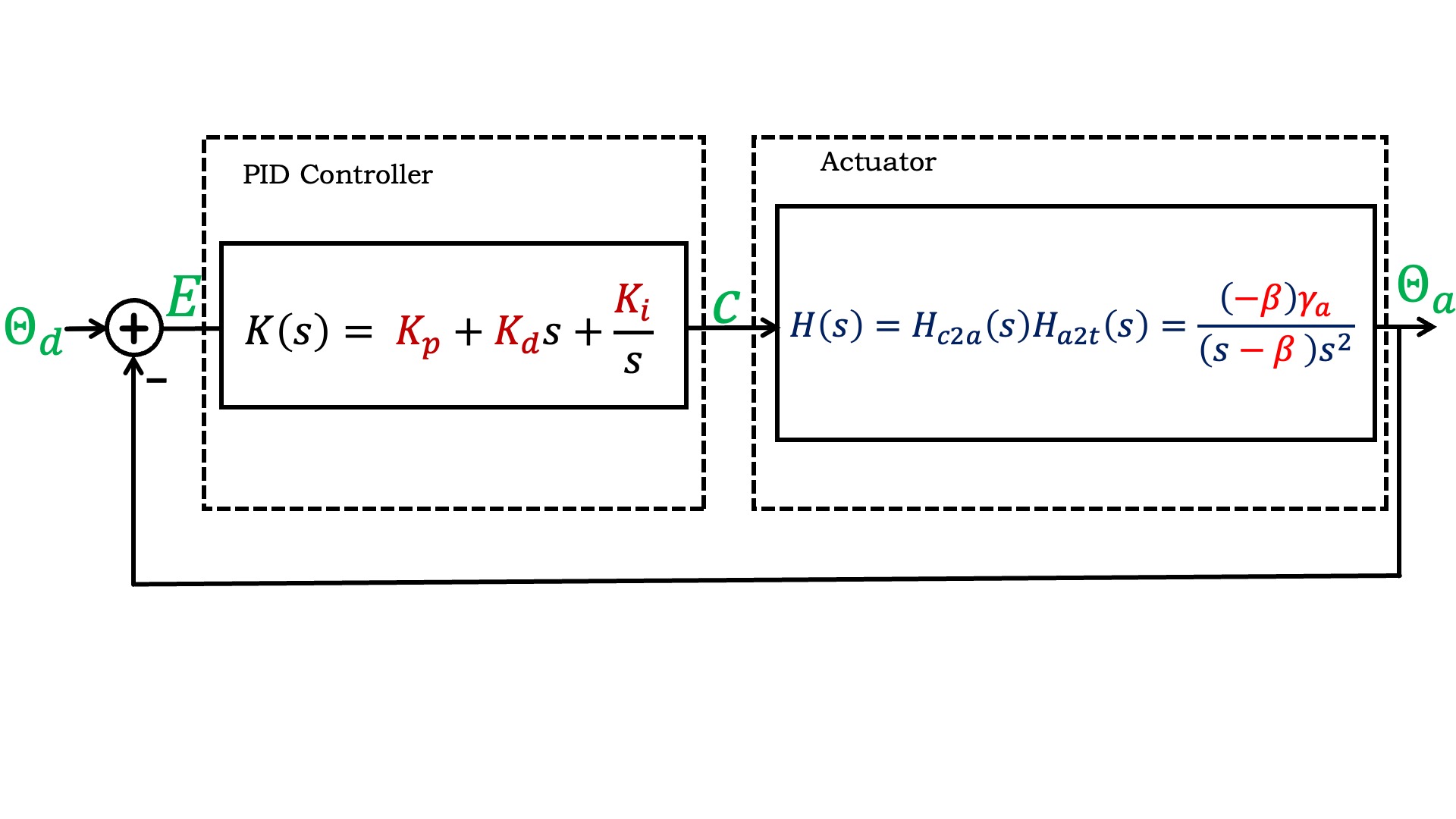
Numerical Tools for CT and Frequency Response.
We will use numerical tools in ipython to help simulate our system. After opening ipython, be sure you load our file ctPropArm.py (linked at the top of the page). To load the file, at the ipython prompt type
%load ctPropArm.py
After you hit return, you should see output like the image below. If you only see one plot, the plots may be on top of each other, try moving the plot to see if there are others beneath it.
You can use ipython to manipulate continuous-time transfer functions. First, you have to tell python to use s as the CT transform variable, by typing (this is already in the ctPropArm.p file).
>> s = ct.tf('s')
After that, you can define a CT transfer function. For example, suppose your system is described by a set of differential equations
In ipython, if you type
>> H = (1/(s+0.1))*(1/s)*(1/s)
followed by
>> print(H)
ipython will respond with
H =

        1
  -------------
  s^3 + 0.1 s^2
Then if you type
>> pole(H)
ipython will respond with something like
[0, 0, -0.1000]
as you would expect since in CT, two of your poles are at zero. Note that the is no specific meaning to the order of the poles, so you might see,
[-0.1000, 0, 0],
or the since the poles can be complex in general, you might see
[-0.1+0.j 0. +0.j 0. +0.j],
all of which are equivalent.
Many (feedback, step, etc), and we will also make extensive use of frequency plots. You can use the classic bode command
bode(H)
which plots magnitude in decibles versus frequency in radians/second. We have created a version that plots magnitude versus frequency in Hertz (cycles per second), which is easier to compare to experiments. To use our non-classical Bode type
bodeF(H)
Our example file should have produced frequency response outputs for both of the two commands above, see the image above.
For example, consider a system with input x(t) and output y(t) described by a first-order differential equation,
The transfer function is easy to compute using the techniques described in lecture and above, and is H(s) = \frac{1000}{s+1}. If x(t) = u(t), the unit step, then x(t)=0 for t < 0, and x(t) = 1 for t \ge 0. To plot the response to the unit step using ipython, in the command window type (be sure you have loaded our ctPropArm.py file),
H = 1000/(s+1)
to define the transfer function to ipython, and then
step(H)
to plot y(t) given x(t) = u(t). Note that y(t) rises to 1000 with a time constant of one second (about two-thirds of the rise in one second).
The frequency response of this first-order system can be plotted using
bode(H)
or
bodeF(H)
Our ipython file uses the command feedback to apply Black's formula to K(s)H(s), but the feedback command applies a more general form of Black's formula than we have seen so far. The feedback command takes two transfer function arguments, H_1 and H_2 to compute an input-output transfer function. In particular, if
G = feedback(H_1, H_2)
will compute the input-output transfer function
If we use unity-gain feedback with this first order system, then
G = feedback(1000/(s+1),1)
To plot the step response of the feedback system,
step(G)
The frequency response also shows the impact of including the first-order system in a closed loop, as can be seen in the plot generated by
bode(G)
or
bodeF(G)
What is different about the open-loop to the closed-loop step and frequency responses?
If we want to determine y(t) given x(t) = \cos{\omega t} in the limit of large t (what we call sinusoidal steady state), we can use the frequency response. That is,
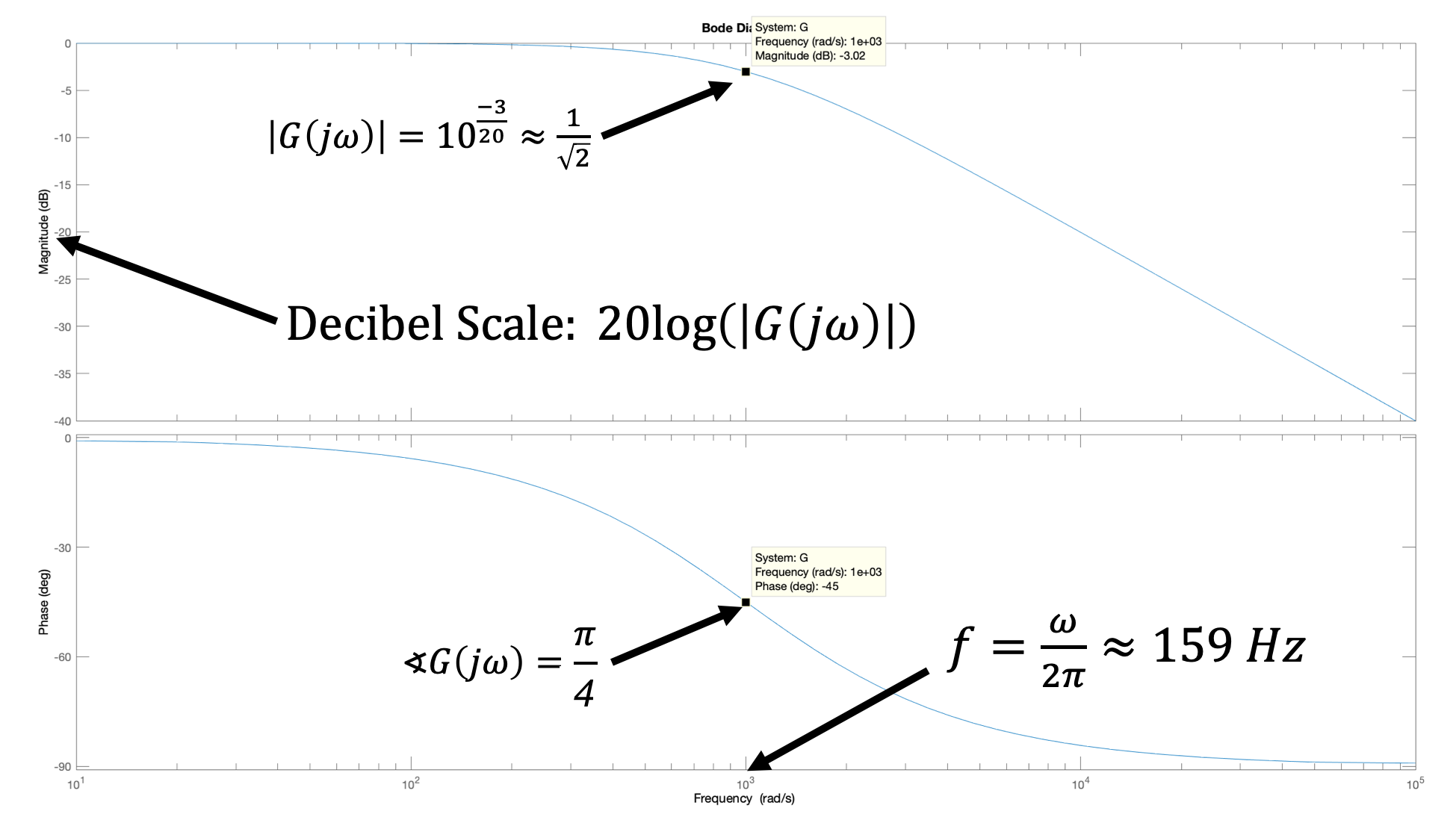
Implement the model
Determine an expression for Hc2a.
gamma_a for \gamma_a, beta for \beta, and common constants as e, j, pi, etc.
Determine an expression for Ha2t.
alpha for \alpha) and common constants as e, j, pi, etc.
Implement your expressions for Hc2a and Ha2t in the python ctPropArm.py linked at the top of this page.
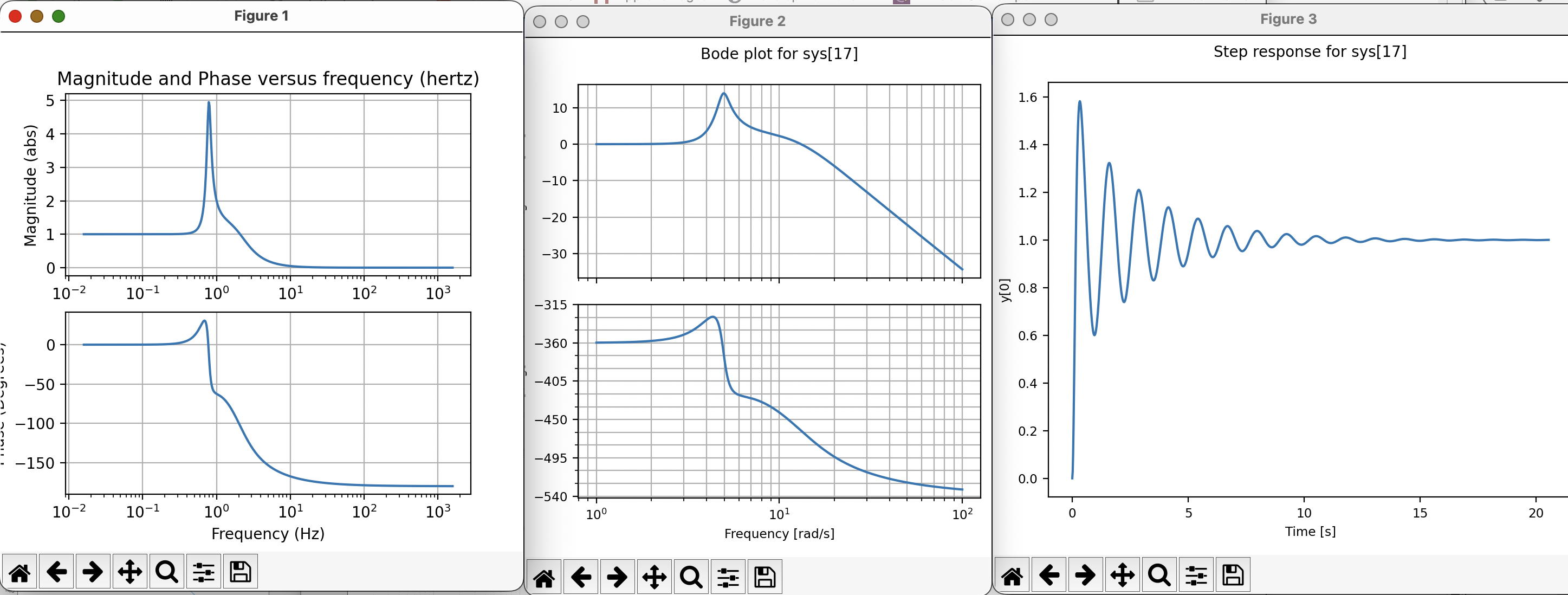
Running the script after you have corrected the transfer functions should produce plots like (but not exactly like) the ones below. On the left is our rescaled Bode plot in which magnitude is plotted directly, and the logrithmically-placed frequencies are in Hz (cycles per second). In the middle is a classic bode plot for which the magnitude is plotted using the logrithmic dB scale and frequency in radians/second. And the plot on the right shows the associated step response
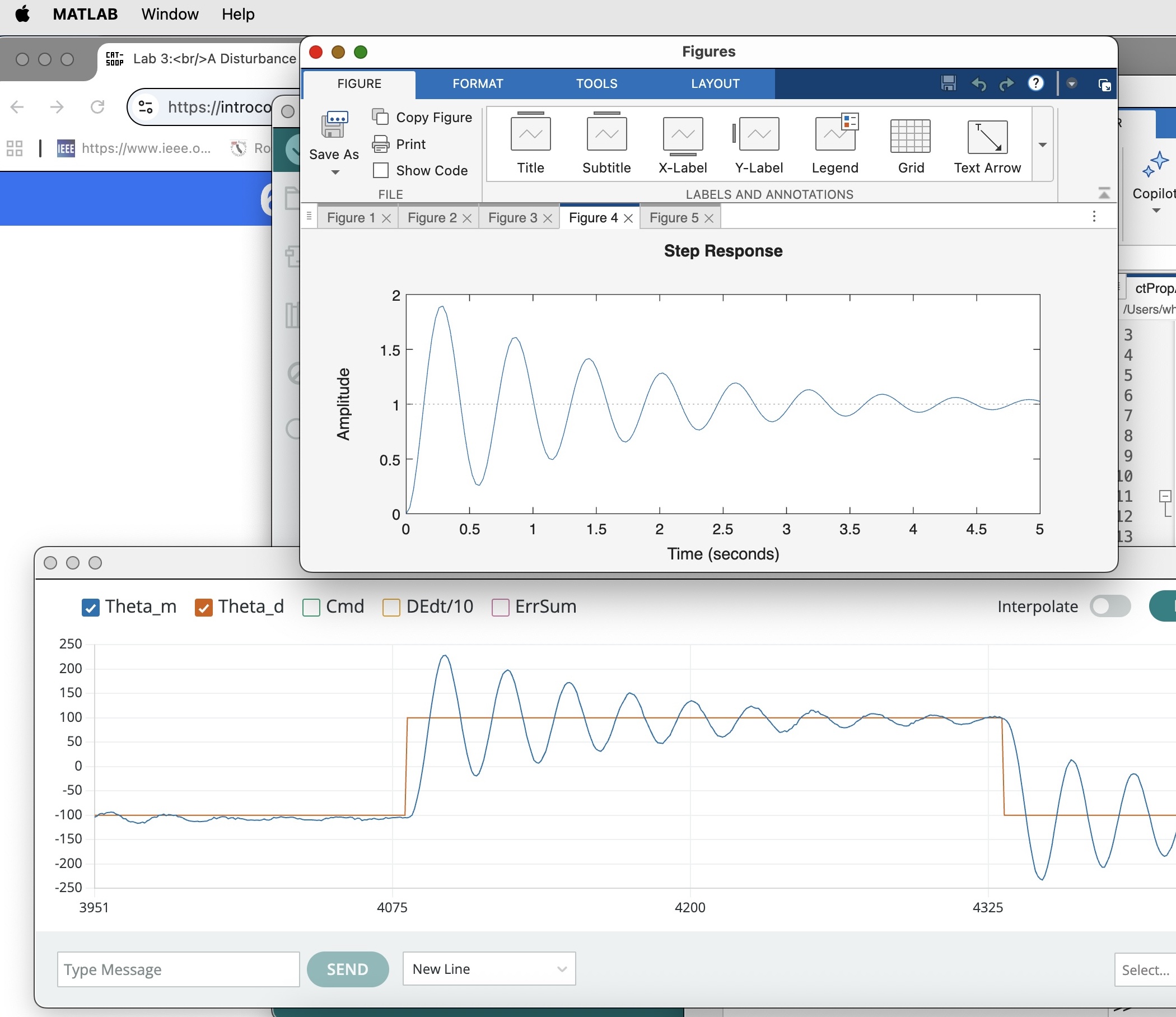
Test 1: Last week, you found the value of K_d for which your system was barely stable when K_i=0.0 and K_p=2.0. Compare those experiment results with the python model. Adjust the parameters, \beta and \gamma_a of the model to get a good match of the step responses of the measurement and model. Also compare frequency responses at a few frequencies (pick ones near the frequency response peak). Once you have a good match, validate your model by comparing its predictions to your arm behavior when you increase K_d enough that the step response only oscillates two or three times before settling (increasing K_d by 0.05 should do it). Does your python model correctly predict the step response changes you observe?
A good way to compare model and measured data (and to make checkoffs go smoothly) is to re-scale the plots so that the time axes are aligned and the amplitudes are visually similar, as in the figure below (the simulated step responses shown in the images below were generated from a different application, but your waveforms should be similar).
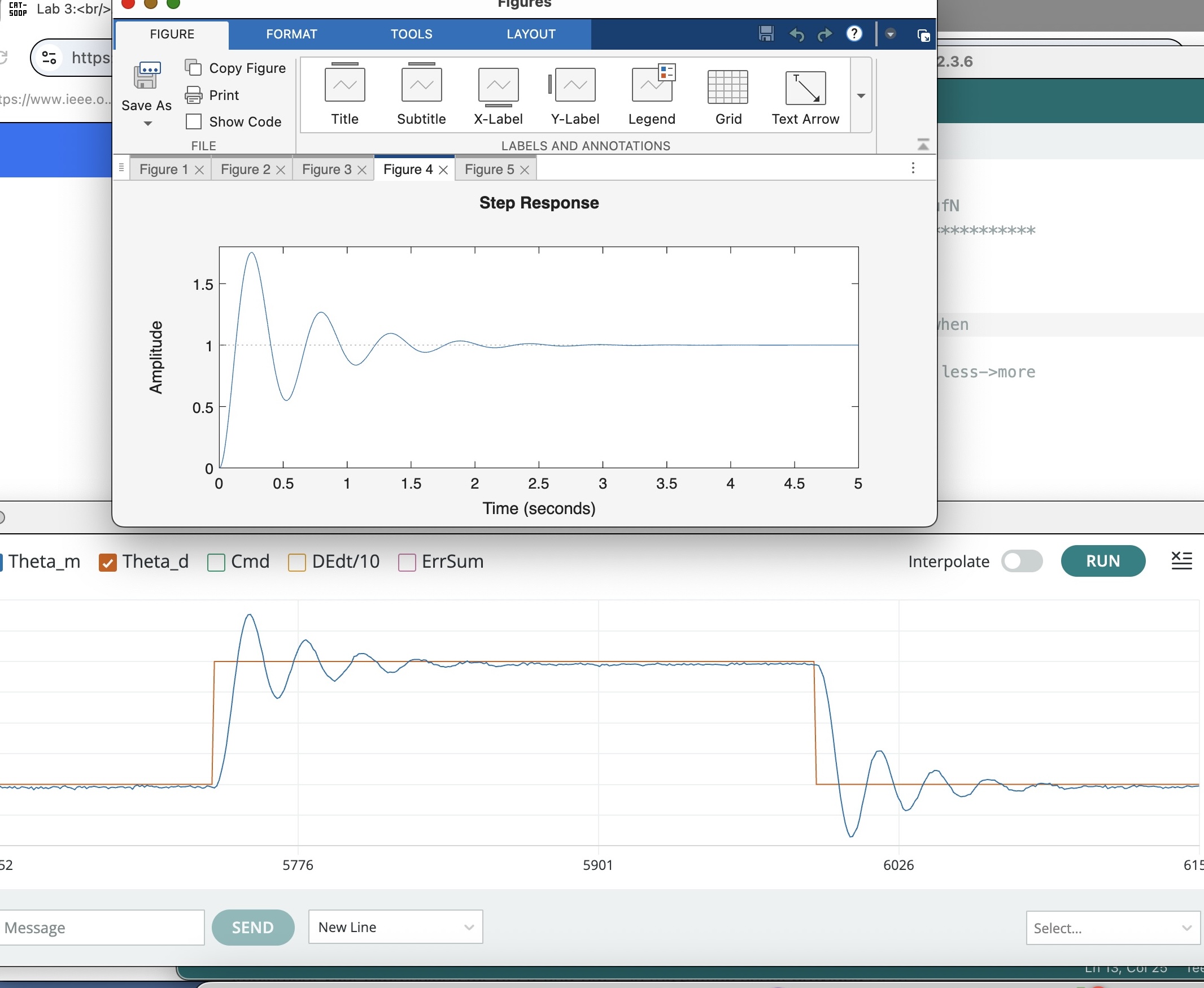
A good model should be predictive when you change to a higher K_d, as in the comparison below. Note that the most important features, e.g. the frequency of the initial oscillation, and how quickly that oscillation decays, are accurately predicted. Note that the model is not perfect, and predicts a higher initial overshoot than seen in the measured data. Why do you think that might be?
Test 2: Test the robustness of your model by changing the K's WITHOUT changing the system parameters \gamma_a or \beta. Try the second set of K's from last week: i.e., K_d was set so that the system was barely stable when K_i=4.0 and K_p=0.5. Compare step responses as well as the resulting resonance frequencies in the measurement and in the model. You will probably notice a poorer match between model and observed step response. What about the frequency response?
Disturbing Problems
For the propeller arm, we have examined two example disturbances, dropping weight and fanning, as shown in the image below.
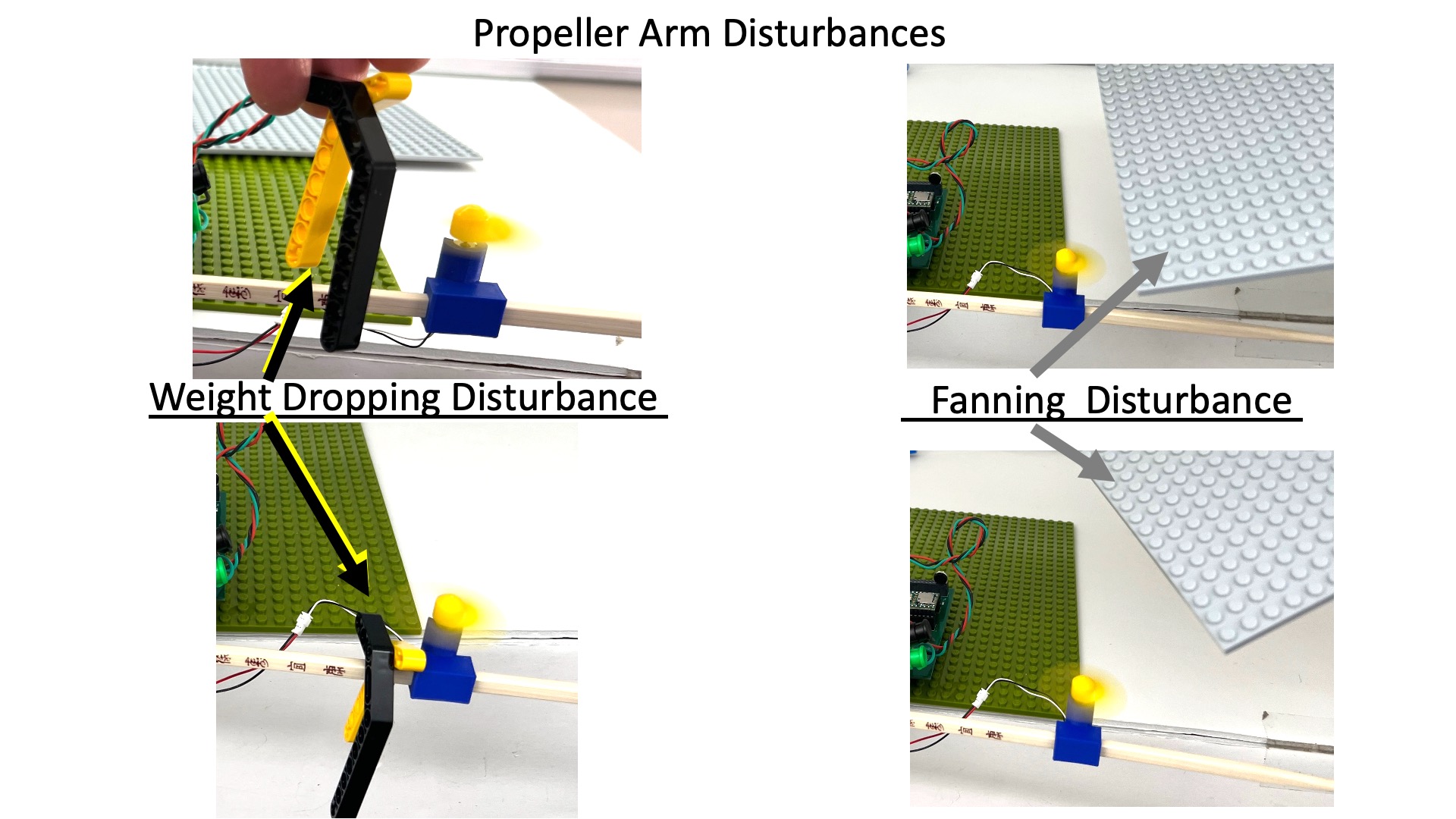
Adding disturbance torques (generated by dropping or fanning) to the abstracted description of arm leads to the image below.
It is simpler to think of the disturbance torques as disturbance accelerations (which is just a rescaling), so it can be added to the CT block diagram, as shown below.
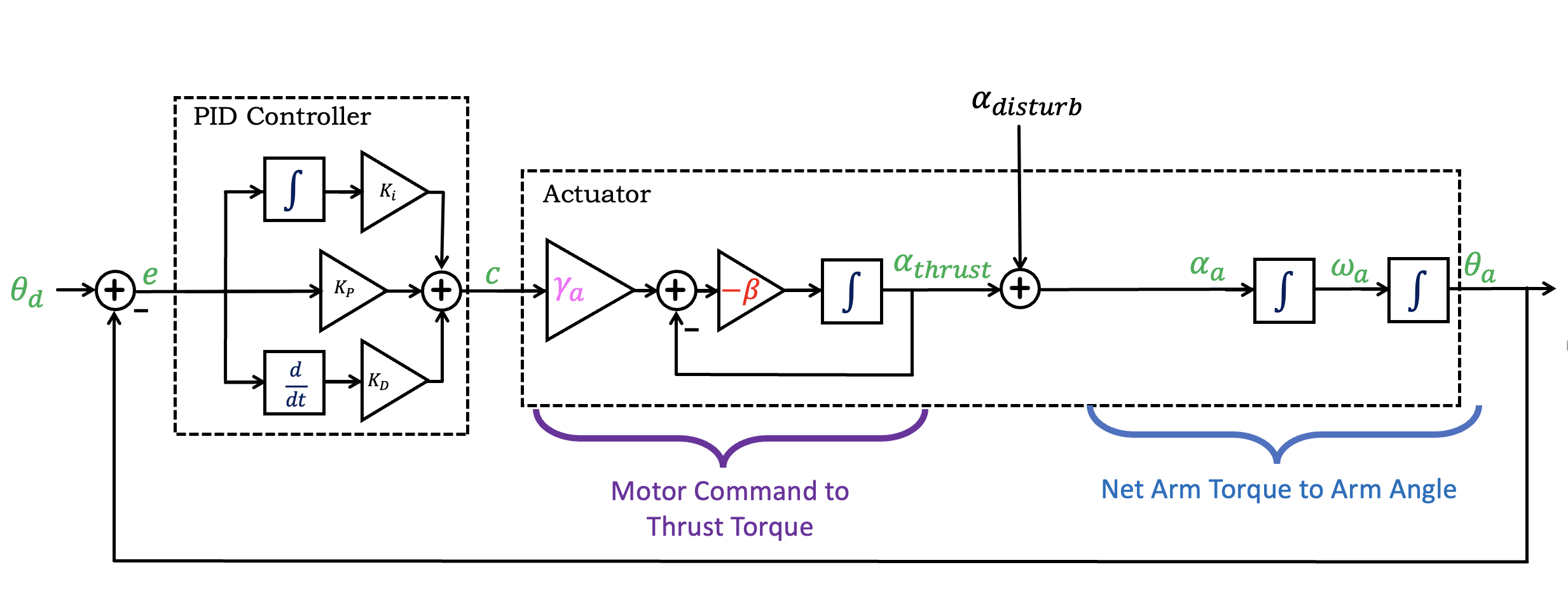
Notice that we introduced \alpha_{thrust}, the acceleration due to the thrust torque generated by the motor-propeller pairs, and added a disturbance acceleration, \alpha_{dist} (as might be generated by "dropping" or "fanning"). Then the sum of two accelerations becomes the arm angular acceleration.
What is the G_{dist}(s), the transfer function from A_{dist} to \Theta_a? To determine that transfer function, we suggest you convert the above diagram using transfer functions (e.g. K(s), H_1(s), and H_2(s) as we did above). Then, rather than trying to use Black's formula directly, try writing two equations and solving. That is, given
Checkoff 6 - Design a less disturb-able controller
Now that you have a calibrated numerical model for your system, and can use the model to plot G_{dist}(j\omega) (to within a scale factor), and you can pick K_p, K_i and K_d to minimize the maximum disturbance response. Please do so, and show that your new controller is less "disturb-able". What can you say about the disturbance frequency response when K_i > 0?
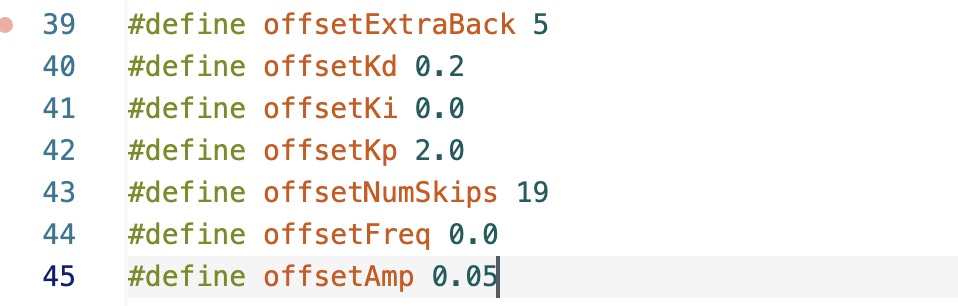
Rather than setting the three gains using the serial plotter send window, you can "preset" the gains in the Teensy file. For example, if you want to preset K_d = 0.2, K_i=0, and K_p = 2.0, you would set offsetKi, offsetKp, and offsetKd as shown in the figure below.